QUESTION 120
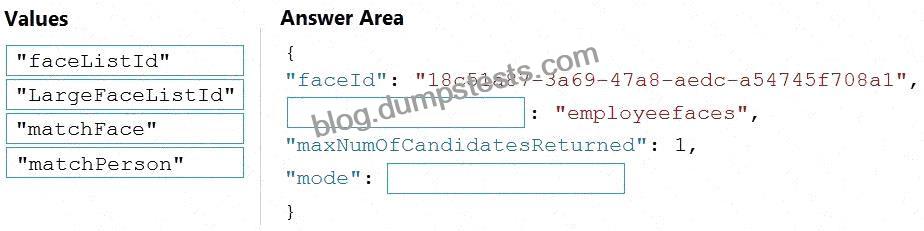
You are developing a call to the Face API. The call must find similar faces from an existing list named employeefaces. The employeefaces list contains 60,000 images.
How should you complete the body of the HTTP request? To answer, drag the appropriate values to the correct targets. Each value may be used once, more than once, or not at all. You may need to drag the split bar between panes or scroll to view content.
NOTE: Each correct selection is worth one point.
Explanation:
You are calling the Face API to find similar faces from an existing list called employeefaces.
Key facts from the scenario:
* The list contains 60,000 images.
* In Face API:
* faceListId # limited to 1,000 faces.
* largeFaceListId # designed for very large lists, up to 1,000,000 faces.
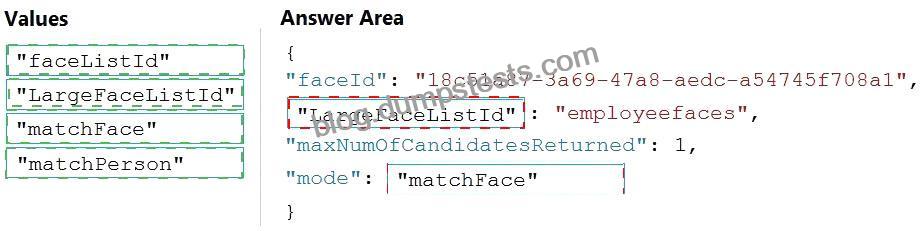
Since employeefaces has 60,000 images, you must use LargeFaceListId, not faceListId.
* “faceId”: “18c51a87-3a69-47a8-aedc-a54745f708a1”
* This is the face to search for.
* “largeFaceListId”: “employeefaces”
* Must use LargeFaceListId because the list has 60,000 images.
* “maxNumOfCandidatesReturned”: 1
* Limits the number of matches returned.
* “mode”: “matchFace”
* Two options exist:
* “matchFace” # returns the most similar individual faces.
* “matchPerson” # groups faces by person.
* Since the requirement is find similar faces, use “matchFace”.
Parameters in the Request Body
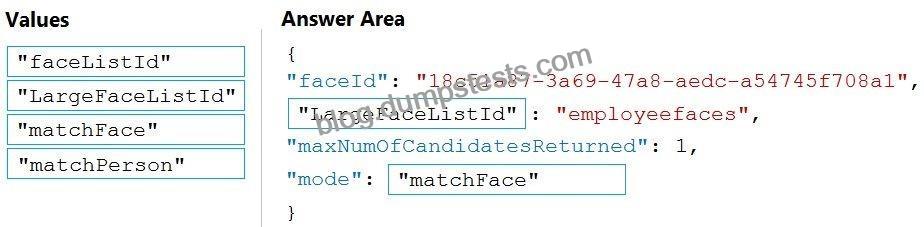
Completed Answer{
“faceId”: “18c51a87-3a69-47a8-aedc-a54745f708a1”,
“largeFaceListId”: “employeefaces”,
“maxNumOfCandidatesReturned”: 1,
“mode”: “matchFace”
}
* LargeFaceListId # “employeefaces”
* matchFace # “mode”
Correct Values to Drag and Drop
Final Answer:
* First blank: LargeFaceListId
* Second blank: matchFace
* Face API – Find Similar
* Face API – Large Face List operations
Microsoft References


No Responses